Does a Prompt-Refinement Loop Make My Local LLM More Accurate?
I wanted to know whether a small, fast model could make a big local model better by polishing my prompts before they run. The plan: a 2B decision model answers questions about the prompt, the big model rewrites it, and after three rounds the big model runs the final version. Would the answers be more accurate? Faster? I built it and measured it.
The setup
- PC: RTX 5060 Ti 16 GB, Intel Core Ultra 5 250K Plus (18 cores), 32 GB DDR5, Windows 11.
- Main model: Qwen3.6-35B-A3B (a community uncensored finetune, IQ4_XS, 18.7 GB) on llama.cpp b10594 with Vulkan. It doesn't fit in 16 GB, so some of its MoE expert layers run on the CPU (
-ncmoe). Thinking is off. - Decision model: LiquidAI d1-2B (Q4_0, 1 GB). It needs llama.cpp b11960 or newer, so it runs on a second llama.cpp build (b12110).
d1 is not a chat model. It reads a piece of text (the "state") and answers typed questions: yes/no (noul), multiple choice, or a score, each with probabilities. It never generates text. llama.cpp serves it at /v1/systemone:
const questions = {
  keeps_all: {
    type: 'noul',
    instructions: 'Does the draft keep all the requirements?',
  },
  clarity: {
    type: 'score',
    instructions: 'How clear is the draft prompt?',
    criteria: ['very vague', 'missing key details',
               'mostly clear', 'fully specified'],
  },
};

const res = await fetch('http://127.0.0.1:8081/v1/systemone', {
  method: 'POST',
  headers: { 'Content-Type': 'application/json' },
  body: JSON.stringify({
    state: { original_request: original, draft_prompt: draft },
    questions,
  }),
});
const { answers } = await res.json();
console.log(answers.keeps_all.noul);  // probability of "yes"
console.log(answers.clarity.score);   // level 0-3
import json, urllib.request

questions = {
    "keeps_all": {
        "type": "noul",
        "instructions": "Does the draft keep all the requirements?",
    },
    "clarity": {
        "type": "score",
        "instructions": "How clear is the draft prompt?",
        "criteria": ["very vague", "missing key details",
                     "mostly clear", "fully specified"],
    },
}

state = {"original_request": original, "draft_prompt": draft}
body = json.dumps({"state": state, "questions": questions}).encode()
req = urllib.request.Request(
    "http://127.0.0.1:8081/v1/systemone", data=body,
    headers={"Content-Type": "application/json"})
answers = json.load(urllib.request.urlopen(req))["answers"]
print(answers["keeps_all"]["noul"])  # probability of "yes"
print(answers["clarity"]["score"])   # level 0-3
The loop
Each loop has three steps:
- Qwen writes 10-15 typed questions about the current draft, as JSON constrained by a schema.
- d1 answers all of them in one call, plus four fixed checks: does the draft keep every requirement, does it add scope, does it leak a solution, and how clear is it (0-3).
- Qwen rewrites the draft from the answers.
After three loops, Qwen runs the final prompt. Here is what three loops did to the one-line prompt write a python function that checks if a string is a valid indian PAN number:
Write a Python function named `is_valid_pan` that checks if a
string is a valid Indian PAN number.

Requirements:
- Input: A single string parameter named `pan_number`.
- Return type: Boolean (`True` if valid, `False` otherwise).
- Validation Logic:
  - The PAN must be exactly 10 characters long.
  - The first five characters must be uppercase letters.
  - The next four characters must be digits.
  - The last character must be an uppercase letter.
  - The validation must be case-insensitive (accept lowercase
    input but treat it as uppercase for validation).
  - Handle `None` or non-string inputs by returning `False`.
- Do not include example inputs or outputs in the function
  docstring unless necessary for clarity.
- Ensure the code is compatible with Python 3.
- Do not check the checksum algorithm; only validate the format.

Return only the function code.
It is clearer, but part of it is invented. I never asked for case-insensitive matching or the docstring rule. Keep that in mind for later.
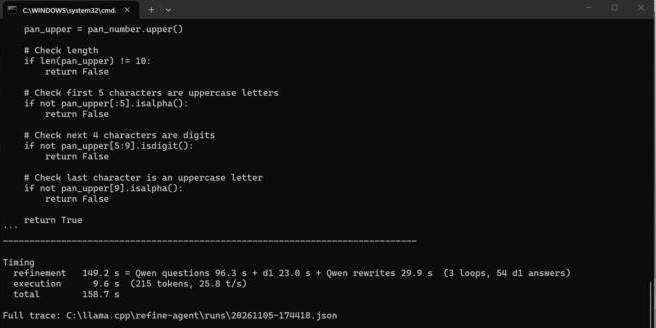
The first full run on my desktop: 149 s of refinement for an answer that took 9.6 s to generate.
Measuring accuracy
To check accuracy, I wrote 29 tasks that grade themselves:
- 12 Python functions checked by hidden unit tests
- 10 word problems with one exact numeric answer
- 7 format checks (exact line counts, valid JSON, SQL run against SQLite, a translation into Tamil, Hindi and French)
Each task ran three ways: the prompt as written (direct), the refined prompt (refined), and the refined prompt with my original request appended (refined + original).
| Mode | Passed | Code | Math | Format | Time per task |
|---|---|---|---|---|---|
| Direct | 28/29 (97%) | 11/12 | 10/10 | 7/7 | 9 s |
| Refined | 27/29 (93%) | 10/12 | 10/10 | 7/7 | 111 s |
| Refined + original | 26/29 (90%) | 11/12 | 8/10 | 7/7 | 111 s |
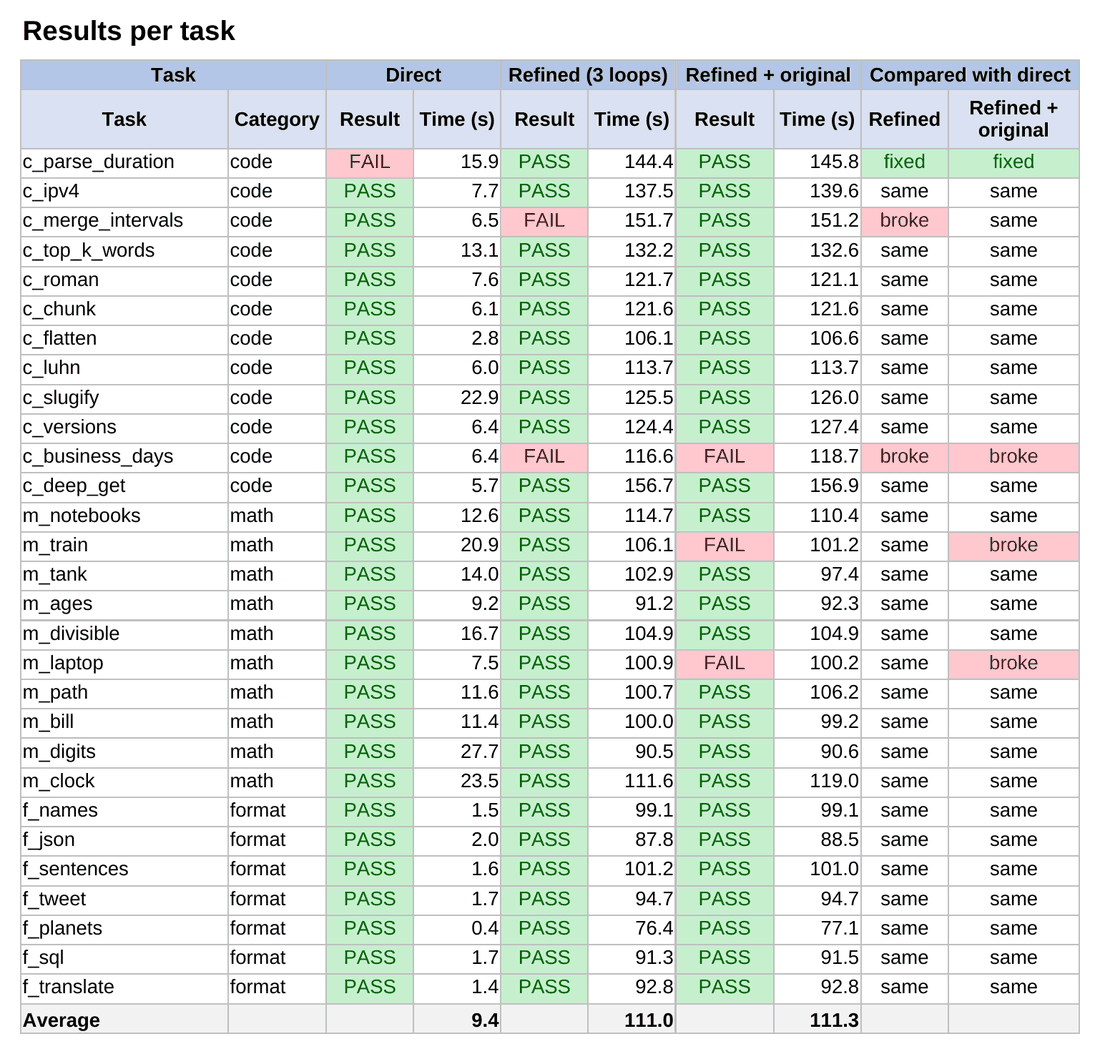
Every task, from the results spreadsheet. Times are server time: Qwen plus d1.
Refinement fixed one task and broke two. With 29 tasks that difference could easily be chance, but it never came out ahead, and every refined task took about 12 times longer.
How refinement broke working code
- c_business_days: during the loops the prompt picked up a rule I never wrote: "Do not include
import datetimein the output." Qwen obeyed, the code usedtimedeltawithout importing it, and 6 of 7 tests failed. d1 judges the wording of the prompt. Nothing in the loop checks whether a new rule leads to a correct answer. - c_merge_intervals: the refined prompt was fine, but Qwen's answer changed the caller's inner lists in place. That is a real bug, and the kind of variance any single sample has.
- Refined + original: appending my original words after the refined prompt confused Qwen on a math task. It answered by writing a new prompt instead of solving the problem.
The one fix was c_parse_duration, where the direct answer's regex kept only the last repeated group, so "1h30m" came out as 1,800 seconds instead of 5,400.
Where the time goes
A refinement averaged 104 s of server time:
- Qwen, 79 s: about 3,100 tokens of questions and rewrites.
- d1, 25 s: 57 answers over about 12,400 tokens.
I expected d1 to take milliseconds. The model card quotes 5.7 ms per decision on an H100, using the Transformers version, which reads up to 16 questions in one pass. llama.cpp answers each question with its own pass over the whole state, and d1's attention is bidirectional (lfm3.attention.causal = False in the GGUF), so the state can't be cached between questions. The cost is questions × state length, and where d1 runs matters a lot:
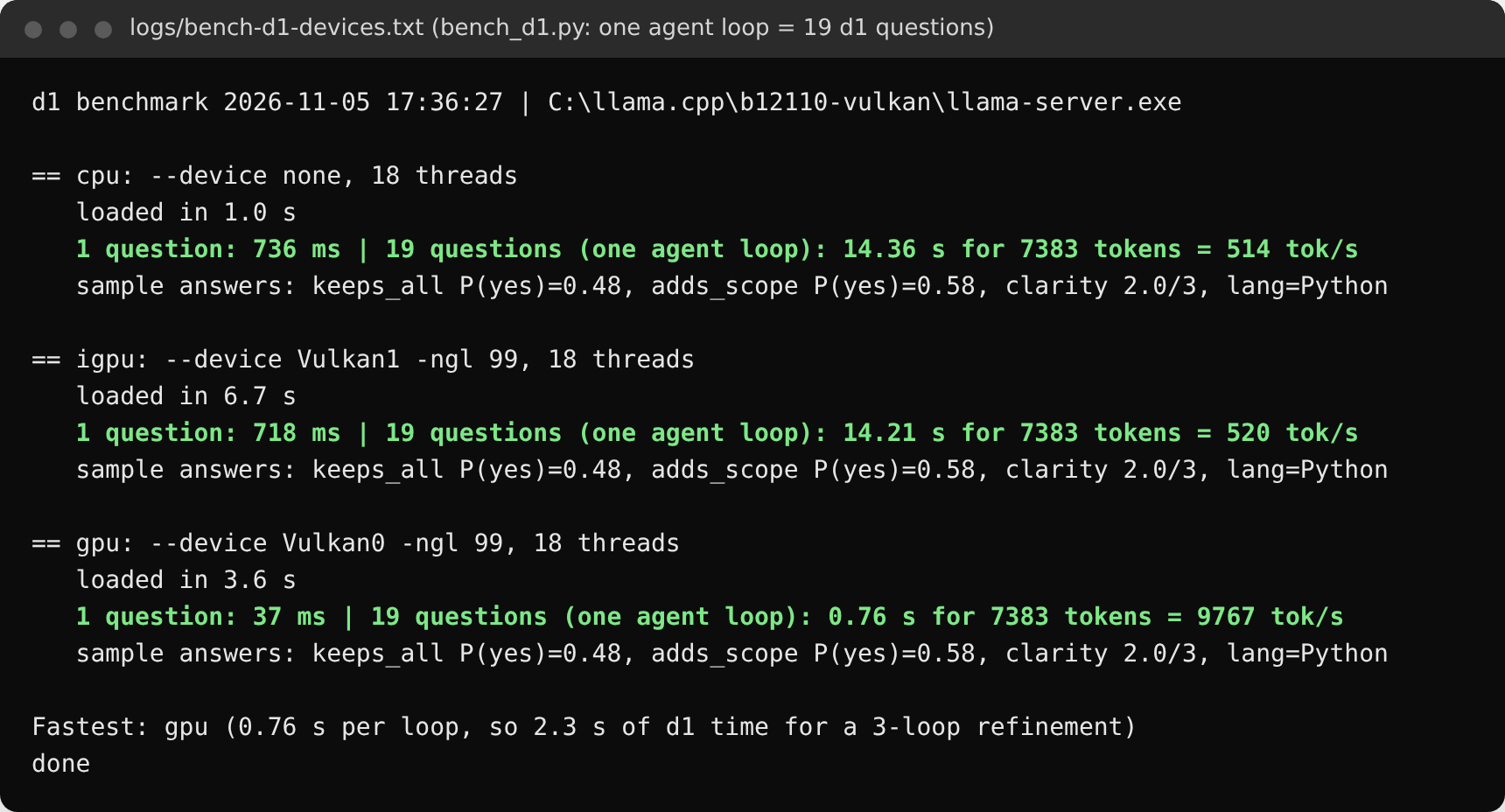
Output of my d1 benchmark: one 19-question loop takes 0.76 s on the RTX 5060 Ti and about 14 s on the iGPU or the CPU.
The GPU was 19 times faster, but d1 needs about 1.5 GB of VRAM, and Qwen was already using it:
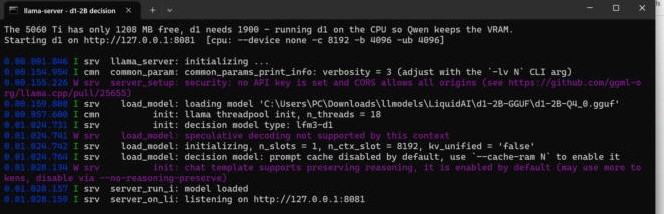
With Qwen loaded, only 1.2 GB of VRAM was left, so the launcher put d1 on the CPU.
I ended up running d1 on the Intel iGPU. It is as slow as the CPU, but it leaves the CPU cores to Qwen's experts and doesn't touch the 5060 Ti.
The surprise: Windows moving VRAM
While testing, Qwen dropped from 44-46 t/s right after loading to 21-27 t/s a few minutes later. The cause was Windows, not the agent. When another app asks for VRAM, Windows can move an idle process's GPU memory into system RAM (counted as "shared"), and it doesn't move it back. On my PC the desktop window manager used 2.5-3 GB of VRAM and Sunshine about 1 GB, so Qwen did not really fit.
The worst case came after 45 seconds of idle: Qwen fell to 13 t/s with 4 GB of its weights in system RAM, while nvidia-smi reported 8 GB free.
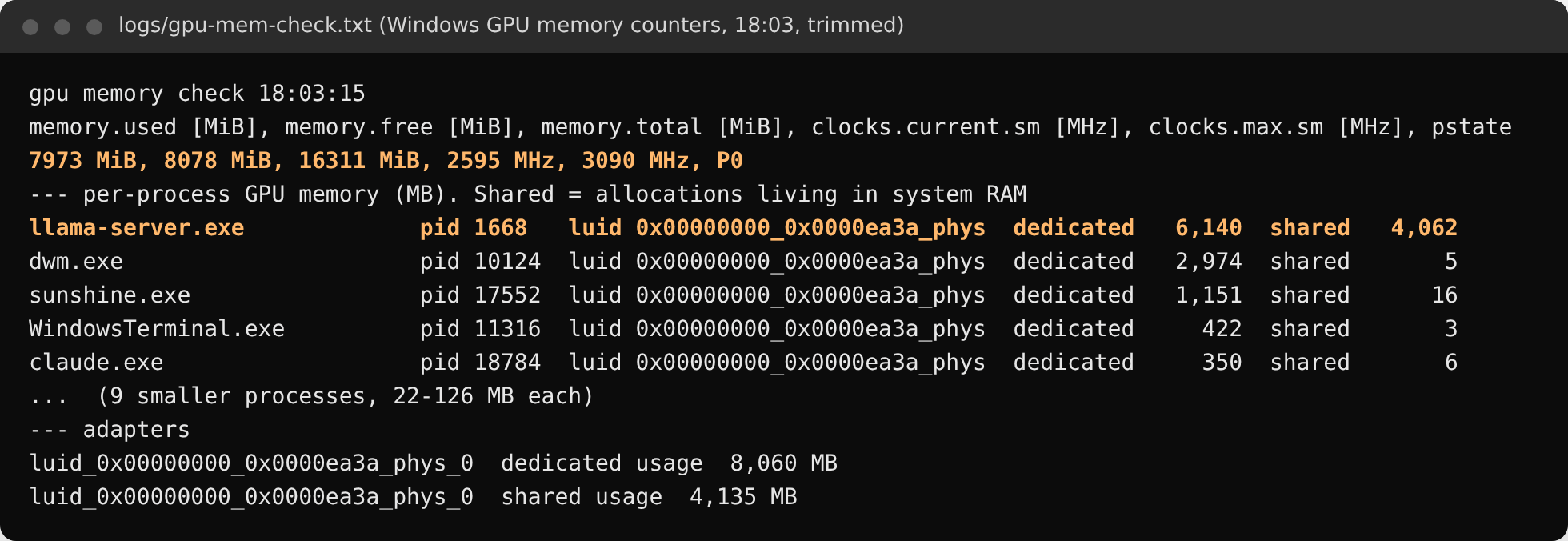
nvidia-smi doesn't count most of the other apps. Windows' own GPU memory counters show where Qwen's memory really is.
The fix was a launcher that picks -ncmoe from the VRAM the other apps actually leave free: 21 expert layers on the CPU instead of 12, and a 32K context instead of 80K. Qwen then stayed in VRAM through the accuracy run, at a median of 48.5 t/s.
Conclusion
On prompts that are already reasonably clear, the refinement loop made Qwen about 12 times slower and no more accurate: 97% direct against 93% refined. A small model that only judges a prompt's wording can't tell whether a rewrite helps, and it let the loop add rules that broke working code.
What I would do instead:
- Judge answers, not prompts. Generate, run the tests, and fix from the real errors.
- Use d1 as a checker or a router, asking it about the output rather than the prompt. On a GPU its answers come back in tens of milliseconds.
- Keep the LLM fully in VRAM. On Windows, check the GPU memory counters, not just nvidia-smi.
Vague one-line prompts might still gain from refinement. That is my next test.